Secure credential handover

The safe way to be handed a password.

When IT genuinely has to ask a user for a credential, SafeHanded encrypts it in the user's browser to one technician's key, ties it to your ticket, and destroys it when the ticket closes.

Free plan, no card Passkey sign-in Hosted in the EU
The technician's view

Every handover, in one place.

Requests, shares and recent activity across your organisation — what needs revealing is surfaced, and what's been purged is accounted for.

app.safehanded.com/app
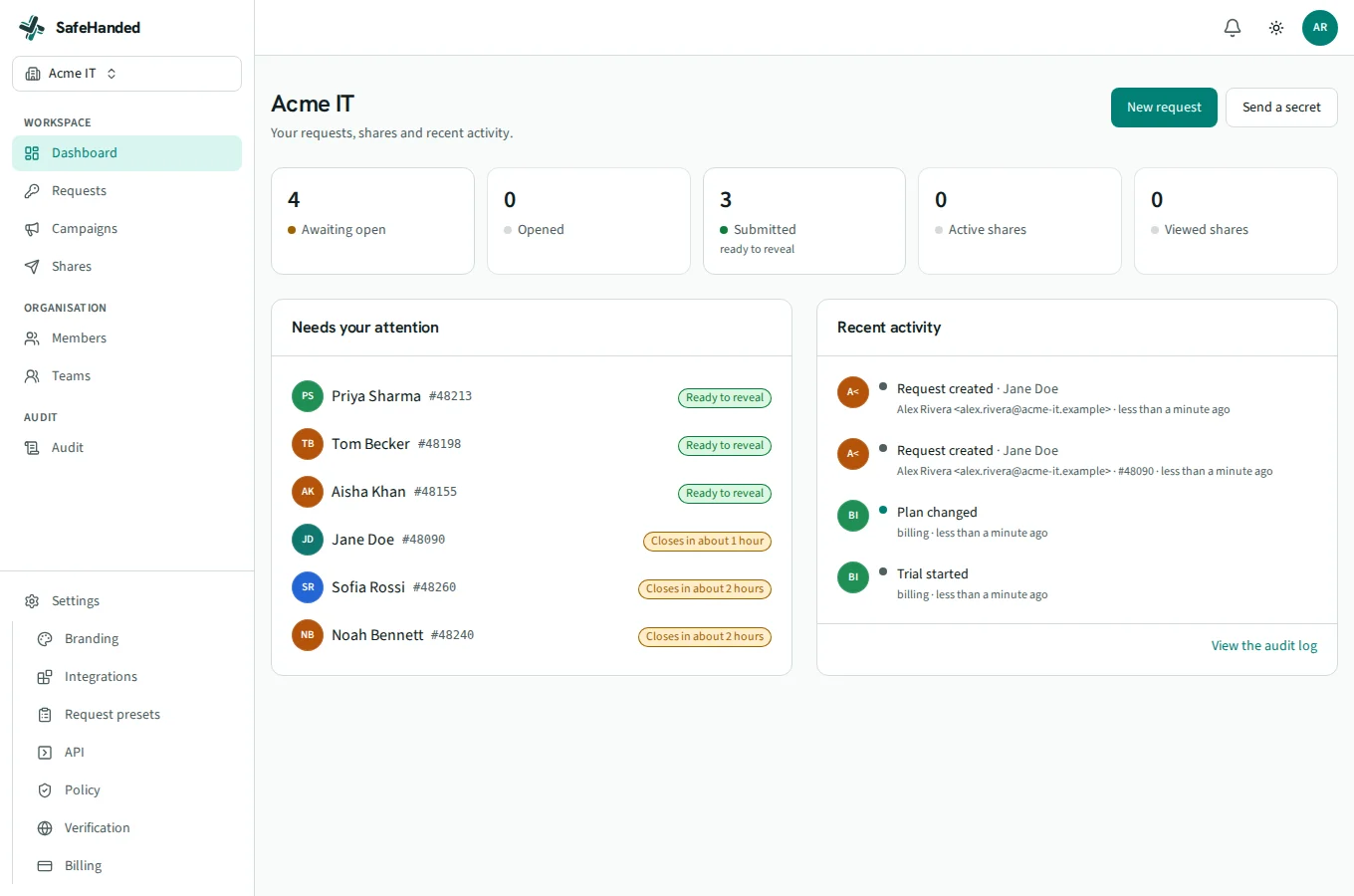
The SafeHanded technician dashboard: status tiles for awaiting, delivered and revealed handovers, with needs-attention and recent activity.
Purged on ticket close#48090 · nothing left behind
Why SafeHanded

Two things a link tool can't do.

Files, QR codes, SSO, an API, we match all of it. These two are architectural, and they're why teams switch.

The record

Encrypted to a person, not a link.

The secret is sealed in the sender's browser to a specific technician's key, unlocked only by their passkey. A leaked or forwarded link lets someone submit, never read. A breach, a rogue operator or a legal order finds no readable credential to hand over.

SEALED ENVELOPE passkey ONE TECHNICIAN forwarded link
The lifecycle

Destroyed when the ticket closes.

The record is created from your helpdesk ticket and purges itself when that ticket closes, automatically, with a note written back and a line in the audit trail. No orphaned passwords left in an inbox, a chat or a link tool.

TICKET #48090 · CLOSED ENVELOPE PURGED
How it works

Three steps, and then it's gone.

1
REQUEST

Ask from the ticket

Who, why, which ticket, how long it may live. The user gets a short-lived, branded link.

2
SUBMIT

Sealed in their browser

The user confirms it's genuine and types the credential, encrypted to the technician's key before anything leaves the device.

3
REVEAL

Unlocked with a passkey

Shown once, then the record dies, on completion, on expiry, or when the ticket closes.

Take the tour

See a real handover, end to end.

About a minute through the actual product: request from a ticket, the branded page your user sees, revealing the credential with a passkey, and the audit trail behind it.

What the user sees

A page they can actually trust.

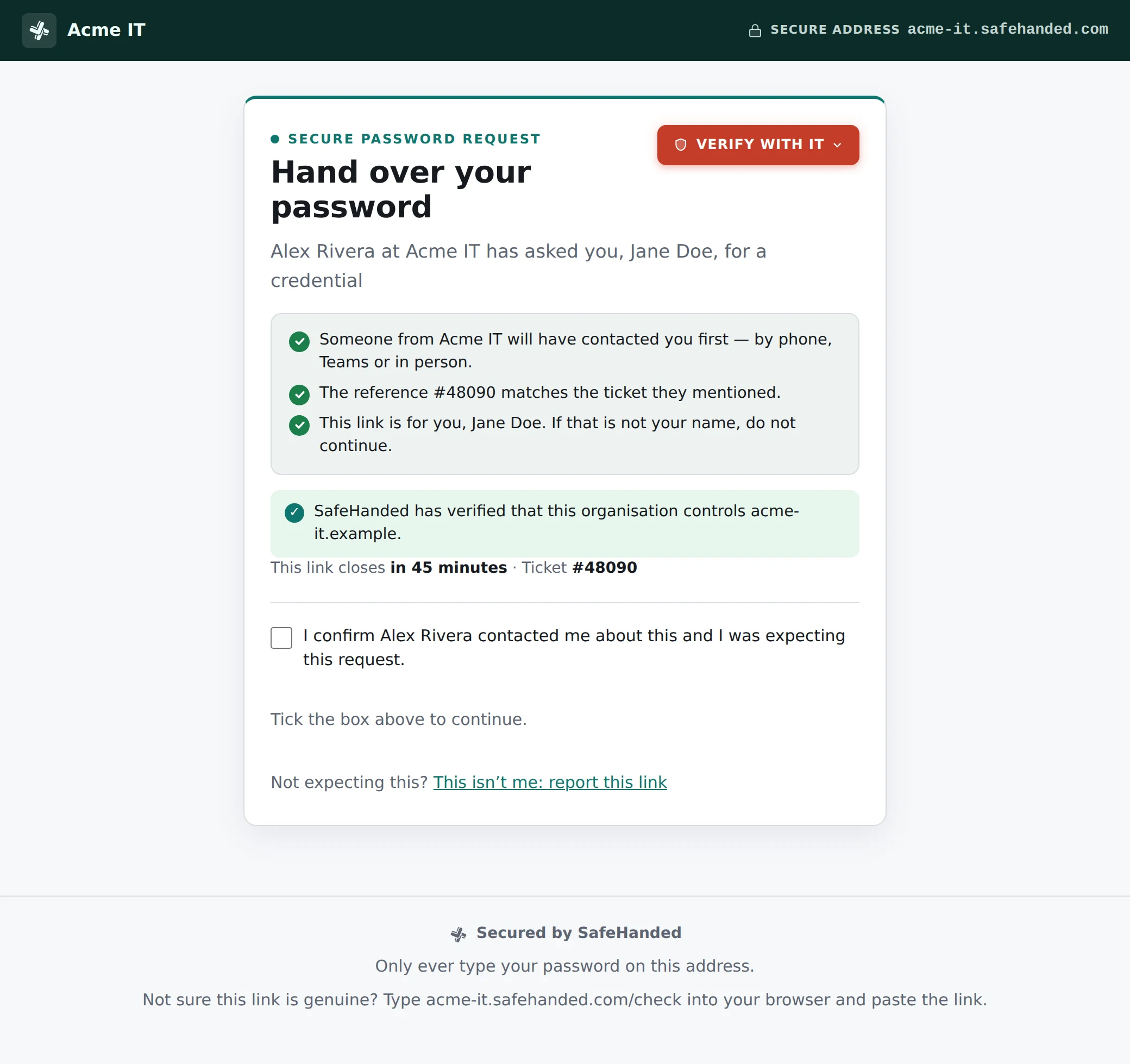
The person handing over a credential is often stressed and suspicious, as they should be. Every handover page is branded as you, on your domain, and makes the legitimate action the obvious one.

Your brand, your domainLogo, colours, named IT contacts, not a generic vendor page.
Verify with ITA spoken challenge code and named contacts a leaked link can't fake.
Encrypted before it's sentSealed in their browser, we never receive anything readable.
help.acme-it.example/h/…
The branded handoff page the end user opens: Acme IT branding, a secure-address bar, verify-with-IT, named trust checks and a verified-issuer confirmation.
SafeHanded Verifier

Give your users a way to check.

Anyone you send a link to can confirm it's genuine, and see who sent it, before they type a thing. Look-alikes are flagged. Try it with an example.

Open the Verifier →

SafeHanded

Check a link

Paste a link you were sent to confirm it is a genuine SafeHanded link and see who issued it. We never open the link or reveal what is inside.

Try an example:

The part of the link after the # is stripped in your browser and never sent to us. Tip: type safehanded.com/check yourself rather than trusting a link in a message.

Who it's for

For the teams who sometimes have to ask.

For MSPs

Run every client's handover on your brand.

Per-client separation, branding and domains, a ticket-linked workflow across ServiceNow, Jira Service Management, Freshservice and more (HaloPSA and ConnectWise PSA in preview), and audit evidence your clients and their cyber-insurers can read.

See SafeHanded for MSPs →
For internal IT

Stop passwords living in Teams and tickets.

Microsoft Entra, OpenID Connect, SAML and SCIM sign-in, mandatory passkeys, directory autocomplete for subjects, and a tamper-evident audit log, with a vendor that holds no key to your secrets, even if compelled.

Read the security model →
Get started

Give IT a safe way to be handed a password.

Start on the free plan in minutes. Move to a trial when you're ready for clients and PSA, no card until you decide to stay.